
What is cellucid-python?#
Audience: wet lab scientists, computational users, developers
Time: 5–15 minutes
Goal: understand what cellucid (cellucid-python) does and which workflow to use
cellucid-python is the repository folder name in this monorepo. The Python package you install is named cellucid:
pip install cellucid
If you remember one sentence:
cellucidturns your data (often AnnData) into something the Cellucid web app can load, and it can also serve/embed the web app so you can use it from the CLI and notebooks.
Note
Cellucid itself is a web app (the viewer UI). cellucid-python,
cellucid-r, and cellucid-annotation provide language and workflow
integrations around that viewer.
What cellucid (Python) does (today)#
At a high level, the Python package supports three related workflows:
View immediately (no export): AnnData → viewer
Notebook:
show_anndata(adata, dataset_name="My dataset", dataset_id="my-dataset")(or use the same required identity arguments with"data.h5ad")Browser:
cellucid serve data.h5ad --dataset-name "My dataset" --dataset-id my-dataset
Export for speed + sharing: arrays → export folder → viewer
Python:
prepare(..., out_dir="exports/my_dataset")Then view in a browser:
cellucid serve exports/my_dataset
(or embed in a notebook:show("exports/my_dataset"))
Notebook integration (bidirectional): viewer ↔ Python
Send commands to the UI (highlight, color-by, visibility, reset camera)
Receive events from the UI (selection/hover/click/ready) as Python callbacks
The other Cellucid repos (how they relate)#
Cellucid web app: the browser UI you click around in (rendering, filters, highlights, analysis, figure export, sessions).
cellucid(cellucid-python): export/serve/embed data + hooks/events for notebooks.cellucid-annotation: community annotation workflows (multi-user, GitHub-backed collaboration).cellucid-r: prepares Seurat, SingleCellExperiment, matrices, and data frames as Cellucid export folders; see R Package Guide.
Fast path (wet lab / beginner / non-technical)#
If you’re a wet lab scientist or a non-technical collaborator, it helps to think in terms of “what do I open?”:
You usually open a dataset in the browser (Cellucid web app).
That dataset is either:
an export folder someone generated for you, or
a dataset served by a collaborator’s machine/server.
What you typically do next (in the web app)
Load the dataset
Color by a field (clusters, condition, QC metric, or a gene)
Select a population
Compare groups / export a figure / save a session
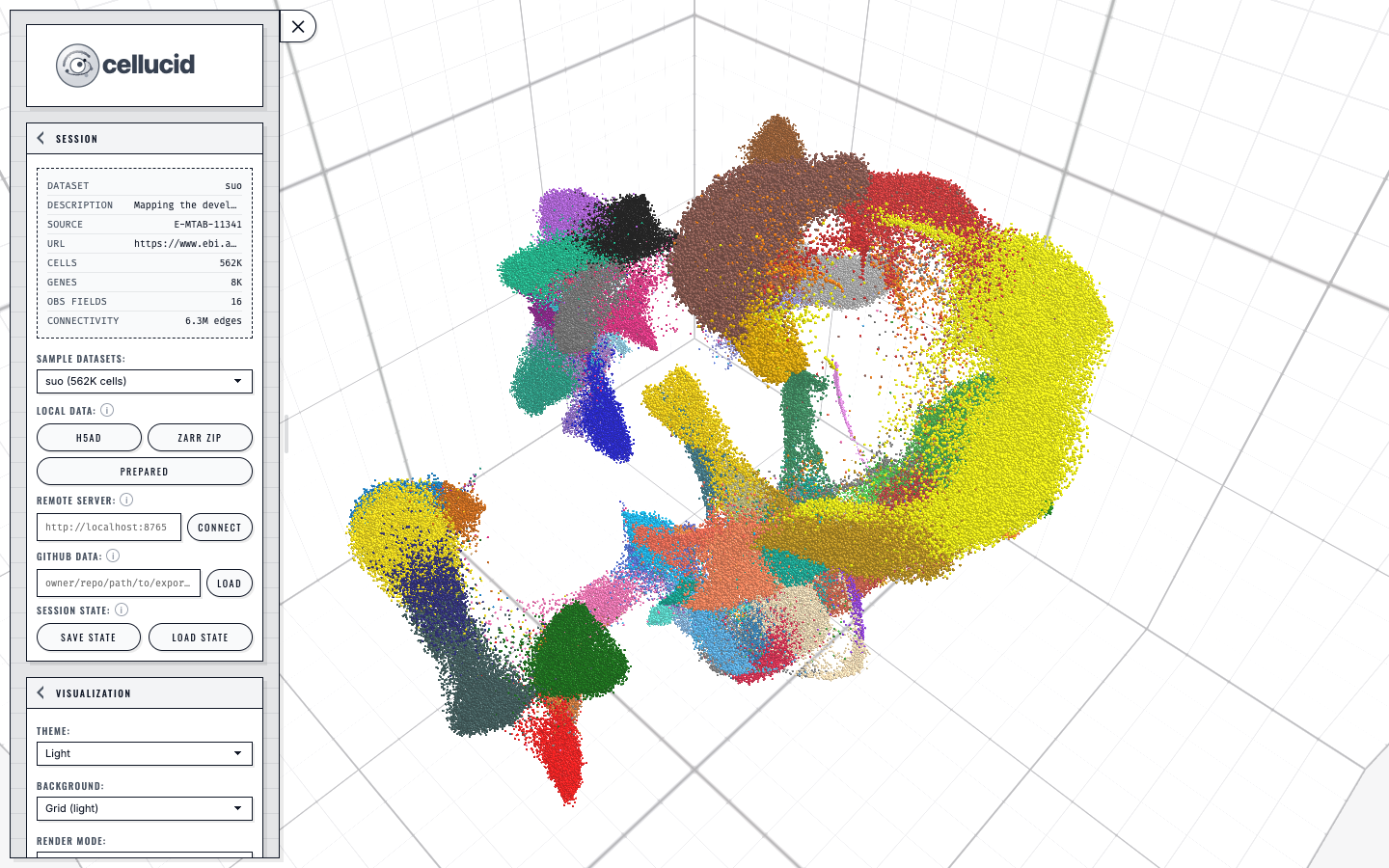
A loaded dataset in Cellucid: the sidebar controls the active view while the categorical legend maps directly to the colored points.#
Practical path (computational users)#
For computational users, the main question is: Do I export first, or do I serve AnnData directly?
Option A — AnnData direct (fast iteration; slower viewing)#
Use this when:
you want to inspect a dataset quickly without deciding export options yet,
you’re working interactively and don’t care about a shareable on-disk artifact yet.
Typical entry points:
Notebook: direct AnnData viewing with required
dataset_nameanddataset_idBrowser:
cellucid serve data.h5ad --dataset-name "My dataset" --dataset-id my-dataset
Tradeoffs:
Very little setup
.h5aduses read-only backed access;.zarris loaded eagerly in Python.Slower than exports for repeated use and large datasets
Not a deterministic “artifact” you can hand to collaborators
Option B — Export-first (reproducible + fast viewing; more setup)#
Use this when:
you want the fastest experience in the web app,
you want a shareable export folder for collaborators or papers,
you want explicit control over compression/quantization and output size.
Typical entry points:
Python:
prepare(..., out_dir="exports/my_dataset")Then view:
cellucid serve exports/my_dataset(or open the folder in the web app)
Tradeoffs:
Fast loading and consistent performance
Reproducible artifact you can archive/share
Can be hosted (static) or served locally
Requires you to choose inputs (embeddings, latent space, obs, etc.)
Supported “starting points”#
Cellucid-python supports viewing from:
In-memory AnnData (notebook/server)
.h5adfile (server and notebook; default: lazy loading via backed mode).zarrstore (server and notebook; loaded eagerly in Python)Pre-exported directory created by
prepare(...)
Deep path (developer / maintainer)#
The architecture is intentionally simple:
A local HTTP server serves either:
files in an export folder, or
“virtual files” generated from AnnData on demand.
The viewer UI is a web app.
In CLI/notebook/server workflows, the Python server establishes the exact complete UI generation declared by the configured source inventory, then serves it from the same origin as the dataset.
Notebook embedding uses an iframe.
This matters because browser security rules differ across Jupyter/VSCode/Colab.Bidirectional communication:
Python → frontend:
postMessageto the iframe (viewer.send_message(...)+ convenience methods)Frontend → Python: HTTP
POSTto/_cellucid/eventson the local server (hooks)
If you maintain or extend cellucid, the “mental model” to keep in mind is:
A viewer is “just” a dataset server + a browser UI + a small message protocol to coordinate state.
Key terms (used throughout this guide)#
Export folder: a directory of
.jsonmanifests + binary files that the web app loads.Dataset identity:
dataset_identity.json(name/id/metadata; helps reproducibility).Embedding:
points_1d.bin,points_2d.bin, orpoints_3d.bin.obsfields: per-cell metadata (categorical or continuous).var/ gene expression: per-gene metadata + expression values (optional).Viewer: a notebook object that embeds the UI and exposes hooks/commands (
CellucidViewer/AnnDataViewer).Hooks / events: selection/hover/click/ready callbacks from the UI back into Python.
Edge cases and limitations (high-level)#
Web UI availability: every viewer-serving startup establishes the complete exact generation published by the configured web source. Source failure is raised before the server binds.
HTTPS notebooks: if your notebook is served from
https://..., your browser may block anhttp://127.0.0.1:<port>iframe (mixed content). Expose the port through an HTTPS proxy and pass its exact base asclient_server_url=; see Compatibility matrix (must be explicit).
Troubleshooting (common misconceptions)#
“Do I have to upload my data to a server?”#
No by default:
When you run
cellucid serve ..., your data is served from your machine (default:127.0.0.1only).When you use
show_anndata(...)in a notebook, the dataset is served locally by a background server.
The viewer startup also fetches the declared viewer UI assets (HTML/JavaScript/CSS and related static files) from its configured source and publishes them locally only after complete verification.
“I installed cellucid but I don’t see anything”#
Most common causes:
you ran
show(...)orshow_anndata(...)outside a notebook environment; the helper returns a viewer without displaying or printing it, so openviewer.viewer_urlexplicitly,the exact viewer generation could not be established, so viewer construction raised,
your notebook is served from HTTPS and blocks HTTP loopback iframes.
Start with:
Next steps#
Install and verify the CLI/notebook prerequisites: Installation
Check environment constraints early (VSCode/Colab/HTTPS notebooks): Compatibility matrix (must be explicit)
Get your first view running: Quick start (3 levels)