
Sessions (.cellucid-session bundles)#
Cellucid sessions let you capture what you did in the viewer (highlights, user-defined fields, etc.) into a portable artifact:
File extension:
.cellucid-sessionUse cases:
“I selected/annotated cells in the UI; now I want those labels back in Python.”
“I want to attach interactive exploration results to a notebook or paper.”
“I want a reproducible trail of UI-derived fields.”
This page documents:
CellucidSessionBundle(read/inspect bundles)apply_cellucid_session_to_anndata()(apply bundles to AnnData)
Audience + prerequisites#
Audience
Wet lab / beginner: use the “Apply to AnnData” workflow and the troubleshooting section.
Computational: pay attention to exact dataset identity and cell ordering assumptions.
Developer: read the “Format + safety” section before handling bundles from untrusted sources.
Prerequisites
If applying to AnnData: an
AnnDataobject. Pandas is part of the Cellucid core installation.A session bundle, obtained either from the web app UI or from a notebook viewer.
Fast path (apply UI highlights back onto an AnnData)#
from cellucid import CellucidSessionBundle

bundle = CellucidSessionBundle("my-session.cellucid-session")

# Apply to AnnData (creates new columns in adata.obs / adata.var)
adata2 = bundle.apply_to_anndata(
    adata,
    expected_dataset_id="my-study-v1",
)
Now inspect:
adata2.obsfor boolean highlight columns and user-defined categorical fields.
Practical path (common workflows)#
1) How to obtain a session bundle#
You have two typical options:
A) From the web app UI (download a .cellucid-session file)#
Use this when you explore in the standalone browser viewer (notebook or not).
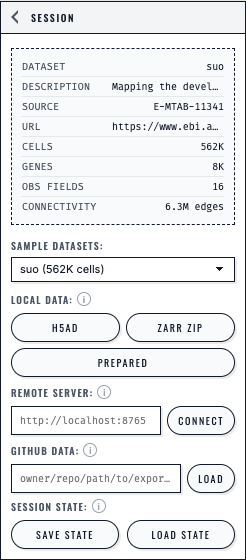
The Session panel presents each loading path separately and keeps Save State and Load State beside the dataset controls.#
B) From a notebook viewer without downloading (advanced)#
Use this when you are running Cellucid inside a notebook and want Python to receive the bundle directly:
viewer.wait_for_ready(timeout=30)
bundle = viewer.get_session_bundle(timeout=60)
2) Inspect what’s inside a bundle#
bundle = CellucidSessionBundle("my-session.cellucid-session")

print(bundle.dataset_fingerprint)
print(bundle.list_chunk_ids()[:10])

# Read decoded payloads (JSON chunks become Python objects)
meta = bundle.decode_chunk("highlights/meta")
3) Apply to AnnData (what gets created)#
Applying a bundle can add:
Highlight membership columns in
adata.obs(typically boolean)User-defined categorical and continuous cell-aligned fields in
adata.obsOptional bookkeeping in
adata.uns["cellucid"](manifest, fingerprint, and chunk snapshots)
Application requires the exact expected_dataset_id. Identity, shape, bounds,
and target-column conflicts are rejected before mutation. You may include or
exclude deleted user-defined fields explicitly.
Deep path (format + safety)#
Treat bundles as untrusted input#
Session bundles may come from:
collaborators,
community annotation workflows,
or downloaded files of unknown origin.
The bundle reader and AnnData applicator include guards:
header/magic validation,
manifest size limits,
chunk decompression limits (zip-bomb protection),
bounds checks for indices/codes.
Format overview (for developers)#
The .cellucid-session framing is:
MAGIC bytes:
CELLUCID_SESSION\nmanifestByteLength(u32 little-endian)UTF-8 manifest JSON bytes
repeated chunks:
[chunkByteLength (u32 LE), chunkBytes...]
Each chunk has metadata in the manifest (kind, codec, expected sizes, ids).
Closed contributor/chunk inventory#
Application validates every manifest entry before decoding any payload. The current inventory is:
Contributor |
Exact chunk identity |
|---|---|
|
|
|
|
|
|
|
|
|
|
|
|
|
|
|
|
|
|
An unknown chunk, unknown contributor, or mismatched contributor/chunk pair
raises before payload decoding and before target mutation. AnnData application
materializes only highlight and user-defined field chunks; the other current
chunks remain in the session bundle, while their manifest entries are retained
in adata.uns when store_uns=True.
Each analysis-artifact identity segment uses the canonical JavaScript
encodeURIComponent encoding. Noncanonical escapes, unescaped reserved
characters, empty segments, or invalid UTF-8 are rejected.
API reference#
CellucidSessionBundle#
- class cellucid.CellucidSessionBundle(path)[source]#
Bases:
objectHandle for a .cellucid-session file on disk.
The reader is streaming-friendly: it indexes chunk offsets once, and only reads/decompresses chunk payloads on demand.
- Parameters:
path (str | Path)
- apply_to_anndata(adata, *, expected_dataset_id, inplace=False, add_highlights=True, highlights_prefix='cellucid_highlight__', add_user_defined_fields=True, user_defined_prefix='', include_deleted_user_defined_fields=False, store_uns=True, return_summary=False)[source]#
Apply this exact bundle atomically to its matching AnnData dataset.
apply_cellucid_session_to_anndata#
- cellucid.apply_cellucid_session_to_anndata(bundle, adata, *, expected_dataset_id, inplace=False, add_highlights=True, highlights_prefix='cellucid_highlight__', add_user_defined_fields=True, user_defined_prefix='', include_deleted_user_defined_fields=False, store_uns=True, return_summary=False)[source]#
Apply a validated session atomically to the exact matching AnnData dataset.
- Return type:
- Parameters:
Edge cases (do not skip)#
Dataset mismatch (most common)#
A bundle is only meaningfully applicable if it matches the dataset it was created from. Common mismatch causes:
you filtered/reordered cells before exporting,
you regenerated the AnnData with different preprocessing,
you are applying a session to a subset.
Any mismatch raises before the target is mutated.
Cell ordering assumptions#
Highlights and codes are stored as indices into the dataset. If your AnnData row order differs, labels will be assigned to the wrong cells.
Conflicting column names#
Applying a bundle can create columns like cellucid_highlight__<group_id>.
If a target column already exists, application raises ValueError.
Backed AnnData#
inplace=False rejects a backed target before AnnData.copy() is called. If
you need an independent result, choose and create it explicitly:
in_memory = backed_adata.to_memory()
result = bundle.apply_to_anndata(
    in_memory,
    expected_dataset_id="my-study-v1",
    inplace=False,
)
inplace=True is accepted without materializing X. It changes the live
backed object’s in-memory obs/uns state and does not write those changes
back to the source H5AD file.
Troubleshooting (symptom → diagnosis → fix)#
Symptom: “Dataset fingerprint mismatch”#
Likely causes:
You’re applying the bundle to a different AnnData (or a differently ordered one).
Fix:
Apply to the original AnnData used to create the session.
Pass the exact dataset ID used to create the viewer.
Symptom: “Not a .cellucid-session file (invalid MAGIC header)”#
Fix:
Confirm the file is actually a
.cellucid-sessionbundle and not (for example) a.jsonexport or a renamed file.
Symptom: “Chunk decompressed too large”#
Fix:
Treat the file as potentially unsafe/corrupted.
If it is trusted but legitimately large, the bundle writer should include
uncompressedBytesin metadata; otherwise, re-export the session.
Symptom: “No highlight columns were added”#
Likely causes:
The session contains no highlight data (no highlights were created).
Dataset identity or dimensions do not match.
You disabled highlight application (
add_highlights=False).
How to confirm:
Inspect
bundle.list_chunk_ids()and look forhighlights/meta.
Fix:
Create at least one highlight group in the UI and re-export the session.
Apply only to the exact matching dataset.
Symptom: KeyError: 'highlights/meta' (or another chunk id)#
What it means:
That chunk does not exist in the bundle (session didn’t include that feature/state).
Fix:
Treat missing chunks as “feature not used in that session”.
Guard your code: check
chunk_id in bundle.list_chunk_ids()before decoding.
Symptom: “Unsupported session chunk codec: …”#
Fix:
Treat the bundle as outside the current contract.
If you control the writer, create a new bundle using the current
noneorgzipcodec contract.
Symptom: “Unknown current session chunk …” or “requires contributor …”#
What it means:
The manifest contains a chunk outside the closed inventory above, or its contributor does not own that exact chunk identity.
Fix:
Do not edit or partially apply the bundle.
Capture a new bundle with the matching current web and Python package.
Symptom: “Column already exists: …”#
Likely causes:
You applied the same session twice, or you already have similarly named columns.
Fix:
Choose non-conflicting
highlights_prefixanduser_defined_prefixvalues, or explicitly remove the existing column before applying.
See also#
Jupyter (notebook embedding + hooks) for capturing a bundle in-notebook (
viewer.get_session_bundle)Jupyter Hooks System (Python ↔ Frontend) for deeper hook/event documentation