
Analysis (Modes, Outputs, Interpretation)#
Cellucid’s Analysis panel helps you turn selections/highlights into interpretable results: summary plots, comparisons between groups, and exportable tables/figures.
These pages are written for mixed audiences:
Wet lab / non-technical: click-by-click recipes and “what success looks like”.
Computational users: definitions, assumptions, and interpretation pitfalls.
Power users: caching/state semantics, edge cases, and debugging playbooks.
Important
Analysis results depend on app state.
At minimum, always confirm:
which view/snapshot is active,
what is currently visible (filters),
what groups you’re comparing (highlight pages / derived pages),
and whether the required data (e.g., gene expression) is available in your dataset.
Tip
If you’re here because “analysis is empty / missing results”, start with Troubleshooting (analysis).
Fast path (pick what you’re trying to answer)#
You want to… |
Start with |
When it’s the right choice |
Next page |
|---|---|---|---|
Get a quick read on a selection/group |
Quick |
You want a fast “is this different?” summary |
|
Inspect distributions and details |
Detailed Analysis |
You need shape/variance/outliers, not just a single number |
|
See relationships between genes/fields |
Correlation Analysis |
You’re asking “do these move together?” |
|
Compare genes between two groups |
Differential Expression (DE) |
You have gene expression and two pages to compare (A vs B) |
|
Score a curated gene program |
Gene Signature |
You have a predefined gene set (pathway/module) |
|
Find markers for many groups at once |
Marker Genes (Genes Panel) |
You want one-vs-rest markers for every group in a categorical field |
|
Interface reference#
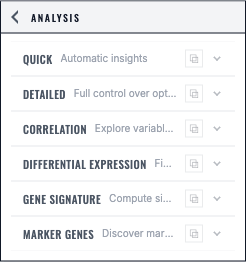
The Analysis panel exposes six explicit modes, each with its own validated inputs and result area.#
Recommended reading order#
01_analysis_mental_model(what analysis operates on + what is cached)02_analysis_ui_overview(where things live; copy/restore behaviors)Mode pages (
03–08) for the specific analysis you need09_exporting_analysis_results(tables/plots, what is reproducible)10_troubleshooting_analysis(symptom → diagnosis → fix)11_screenshots(verified result captures)