
Session Saving, Restoring, and Sharing#
Cellucid sessions are how you persist and share “what the app looks like right now”: camera, active fields, filters, highlights, views/snapshots, and (some) analysis state.
This section is intentionally written for mixed audiences:
Wet lab / non-technical collaborators: click-by-click “save my work and send it to someone”.
Computational users: exact semantics (what is saved, what is excluded, and why rejection is atomic).
Power users / demo builders: eager/lazy ordering, large-session performance, and strict dataset identity.
Important
A session bundle (.cellucid-session) does not contain your dataset.
For a session you saved yourself, you must:
load the exact matching source route, dataset id, cell count, and variable count, then
choose Load State and open the
.cellucid-sessionfile.
Official built-in starting states use a separate, catalog-advertised path: Cellucid applies the matching static state automatically after it publishes and verifies the official dataset generation.
Tip
If you’re here because “I loaded a session but it looks different”, start with:
Current format and dataset identity (exact identity and rejection rules)
Troubleshooting sessions (symptom → diagnosis → fix)
Fast path (choose your goal)#
You want to… |
Do this |
Why it’s the right choice |
Start here |
|---|---|---|---|
Reopen your work later |
Save State → keep the |
Captures UI state; reproducible “what I was looking at” |
|
Start an official sample in its reviewed view |
Choose the built-in sample; its advertised static state applies automatically |
Scientific data publishes first, then the state is integrity-verified |
|
Send someone an exact view |
Send dataset export folder + |
Sessions don’t include data; folder + session is the portable pair |
|
Collaborate on labels with many people |
Use Community Annotation (GitHub-backed) |
Sessions are single-user artifacts; annotation is multi-user |
What to read (recommended order)#
Session mental model (what a session is and how to reason about it)
What gets saved and restored (explicit inclusion/exclusion list)
Save/restore UX (manual save + restore) (manual Save State / Load State)
Official sample starting states (automatic, integrity-verified static states for official samples)
Share workflows (links vs bundles vs exports) (how to share with humans)
Troubleshooting sessions (the big “why did this fail?” map)
Interface reference#
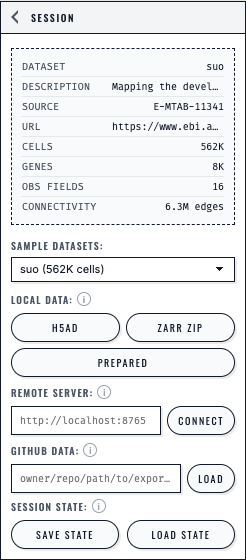
The Session panel presents each loading path separately and keeps Save State and Load State beside the dataset controls.#