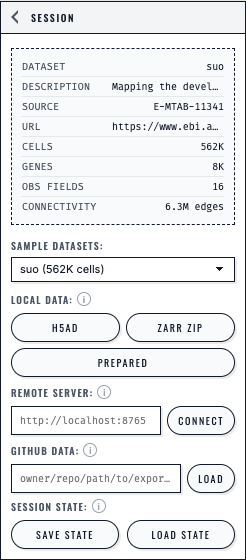
Screenshots (sessions)#
This page is a screenshot capture checklist for the Sessions/Sharing section.
It exists so you (or a collaborator) can capture screenshots once, systematically, without hunting through every page.
How placeholders work#
All pages in this section currently use:
cellucid-python/docs/_static/screenshots/placeholder-screenshot.svg
Each placeholder is preceded by an HTML comment with:
what state to capture,
what to crop/redact,
suggested caption/alt text,
suggested filename conventions.
General guidance lives in:
cellucid/markdown/DOCUMENTATION_SCREENSHOTS_AND_FIGURES_GUIDE.md
Recommended storage location for this section:
cellucid-python/docs/_static/screenshots/sessions_sharing/
Recommended screenshot set (sessions/sharing)#
Session controls UI (orientation) (1 screenshot)#
Capture where users find Save/Load.
Page:
l_sessions_sharing/index(ID:sessions-session-controls-ui)
Save/Load UX (2 screenshots)#
Save/Load buttons in the sidebar
File picker filtered for
.cellucid-session
Page:
l_sessions_sharing/03_save_restore_ux(IDs:sessions-session-controls-ui-save-load,sessions-load-file-picker)
Progressive restore (1 screenshot)#
Capture a visible “restore in progress” state (NotificationCenter progress).
Page:
l_sessions_sharing/01_session_mental_model(ID:sessions-notification-progress)
Highly recommended “failure mode” screenshots#
These are disproportionately useful for onboarding and support:
Dataset mismatch warning (what users should do next)
Capture suggestion: load a session into a different dataset so the warning appears.
Deep dive page: Troubleshooting (sessions) — fast fixesAuto-restore failure (Network tab showing
state-snapshots.jsonreturning HTML or 404)
This is optional but extremely helpful for docs/support.
Deep dive page: Auto-restore latest session (dataset exports)