
Session mental model#
Audience: everyone (wet lab + computational + power users)
Time: 15–30 minutes
What you’ll learn:
What a Cellucid “session” is (and what it is not)
The three persistence layers: dataset vs session bundle vs browser preferences
Why restore is all-or-nothing under the current format
How to choose between sharing a link, sharing a session, and sharing the dataset export folder
Prerequisites:
A dataset loaded in the web app (demo datasets are fine)
Mental model (one sentence)#
A Cellucid session is a portable snapshot of the app’s state (camera, fields, filters, highlights, views, and some analysis UI) saved as a single .cellucid-session file.
What a session is (plain language)#
If you’re not technical, think:
Dataset = the “slide under the microscope” (the actual data).
Session = “how you set up the microscope” (where you looked, what you colored by, what you highlighted).
When you click Save State, Cellucid downloads a file like:
cellucid-session-2025-12-30T02-00-14.cellucid-session
When you click Load State, Cellucid uses that file to restore the UI back to the saved state.
Important
A session bundle does not contain the dataset itself.
It can restore state only after you load the dataset it was created from (or a dataset Cellucid considers the same).
The three persistence layers (this prevents most confusion)#
Cellucid uses multiple “memory” layers. They are easy to mix up:
In-memory state (volatile)
Lives only while the page is open.
Lost if you refresh, crash, or close the tab.
Session bundle (
.cellucid-session)Explicit file you download via Save State.
Intended for:
reopening later,
reproducibility (“these exact views/filters/highlights”),
sharing with collaborators.
Browser preferences (localStorage, small UI conveniences)
Things like theme/background may persist across refreshes.
Not a reproducibility mechanism.
Not meant to be shared.
Practical implication:
If you want to share or reproduce, rely on session bundles (and the dataset export folder).
If you only want the UI to “feel the same” next time on your machine, preferences are enough.
Fast path (wet lab / non-technical): save your work and send it to someone#
Load your dataset.
Explore until you have what you want (color-by, filters, highlights, snapshots).
Open User data → Session state.
Click Save State.
Find the downloaded file (usually in your Downloads folder).
Send the file to your collaborator together with the dataset export folder (or tell them where the dataset is hosted).
To reopen later:
Load the same dataset again.
Click Load State and pick your
.cellucid-sessionfile.
Practical path (computational users): what “state” actually means#
Cellucid has state at different scopes:
Global-ish state (affects what you see everywhere):
some UI controls,
some registries (renames/deletes, user-defined field definitions).
Per-view state (live view and each snapshot has its own):
camera and navigation mode,
which dimension (1D/2D/3D) is active,
which field is active (obs vs var),
which filters are active,
view layout settings.
Sessions exist to capture and restore those scopes in a predictable way.
Ordered restore with one terminal outcome#
Sessions use two scheduling classes:
Eager chunks contain the state needed by later chunks, such as field definitions, active views, and highlight metadata.
Lazy chunks contain heavier arrays, such as highlight membership and analysis artifacts.
This ordering keeps the browser responsive, but it is not partial success. The public load operation waits for both classes, prepares and commits every feature owner, refreshes the final UI, and only then reports Session fully restored. If any later chunk fails, Cellucid rolls back the earlier changes.
Wait for the terminal success notification before treating the restored view as ready. Pressing Cancel, closing its progress card, or starting a newer restore aborts the older operation without publishing false success.
Dataset identity (the first restore check)#
Each session carries an exact four-part dataset fingerprint: source type, dataset id, cell count, and variable count.
If the session’s dataset fingerprint does not match the currently loaded dataset:
Cellucid rejects the complete restore;
no layout-only subset is accepted; and
the existing app state remains intact or is recovered by rollback.
See Current format and dataset identity for the exact matching rules and safe collaboration recipes.
Deep path (power users / developers): what’s in the file (high level)#
A .cellucid-session is a single file that contains:
a JSON manifest (metadata + a list of chunks), and
many length-prefixed chunks (JSON or binary, often gzip-compressed).
Chunks are owned by “contributors” (features). This keeps sessions modular:
core state, highlights, analysis windows, user-defined fields, etc.
Sessions are treated as untrusted input:
the loader exact-validates the manifest and every current chunk profile;
enforces stored, decoded, and gzip structure limits before native decompression;
rejects unknown, missing, duplicate, aliased, or reordered chunks; and
commits the complete transaction or rolls it back.
If you want the code-level reference, see Reference: current session bundles.
When to use sessions vs other artifacts#
Use this decision rule:
Session bundle: when you want to preserve the interactive state (views, filters, highlights).
Exported figure: when you want a publication artifact that does not depend on the app to interpret.
Community annotation: when you want many people to collaboratively label/vote in a conflict-free way (GitHub-backed).
Sessions are great for:
“Please look at this exact selection and camera angle.”
“Here are the highlight groups I think are interesting.”
“Here’s the state right before I ran DE; can you verify?”
Sessions are not ideal for:
multi-user, long-running labeling workflows (use community annotation),
distribution of the dataset itself (share the export folder or hosting link).
What changes in app state when you load a session#
Loading a session is intentionally “strong”:
It overwrites most of your current view state (camera, active fields, filters, etc.).
It may cancel an in-progress session restore if you load another session.
It explicitly replaces empty state too: an empty Camera Path or analysis cache clears the corresponding destination state.
If you want to preserve your current work, save a session first, then load the other session.
Interface reference#
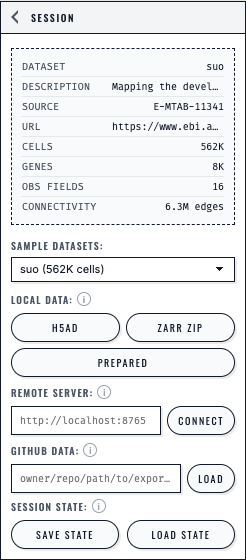
The Session panel presents each loading path separately and keeps Save State and Load State beside the dataset controls.#
Next steps#
What gets saved and restored (explicit inclusion/exclusion list)
Save/restore UX (manual save + restore) (Save State / Load State step-by-step)
Share workflows (links vs bundles vs exports) (how to share with collaborators)
Troubleshooting sessions (if anything goes wrong)